ChatGPT helps you write.
Thanis helps you know what to revise.
Use ChatGPT to brainstorm, draft, revise, or work through an idea. Use Thanis when you already have a draft and want to know how it holds up, what needs work, and what to tackle first.
At a glance
Brainstorm, draft, revise, ask questions, or work through ideas.
Check a draft you already wrote and decide what to improve.
Answers, ideas, generated text, rewrites, or feedback.
A clear look at how the draft is doing, why, and what to work on first.
Ask for what you want through the conversation.
Choose the kind of review and give Thanis the draft.
ChatGPT can generate or rewrite language for you.
Thanis leaves the draft alone and tells you what deserves attention.
Two different ways to get feedback.
You shape the feedback through the conversation.
Thanis organizes the review for you.
Yes, ChatGPT can review a draft.
The difference is what comes back. ChatGPT gives you feedback through a conversation. Thanis gives you an organized review you can scan: how the draft is doing, why, and what deserves attention first.
You do not have to figure out the perfect review prompt. Choose the kind of writing, give Thanis the draft, and Thanis walks through it with the right review in mind.
Here’s what Thanis gives you back.
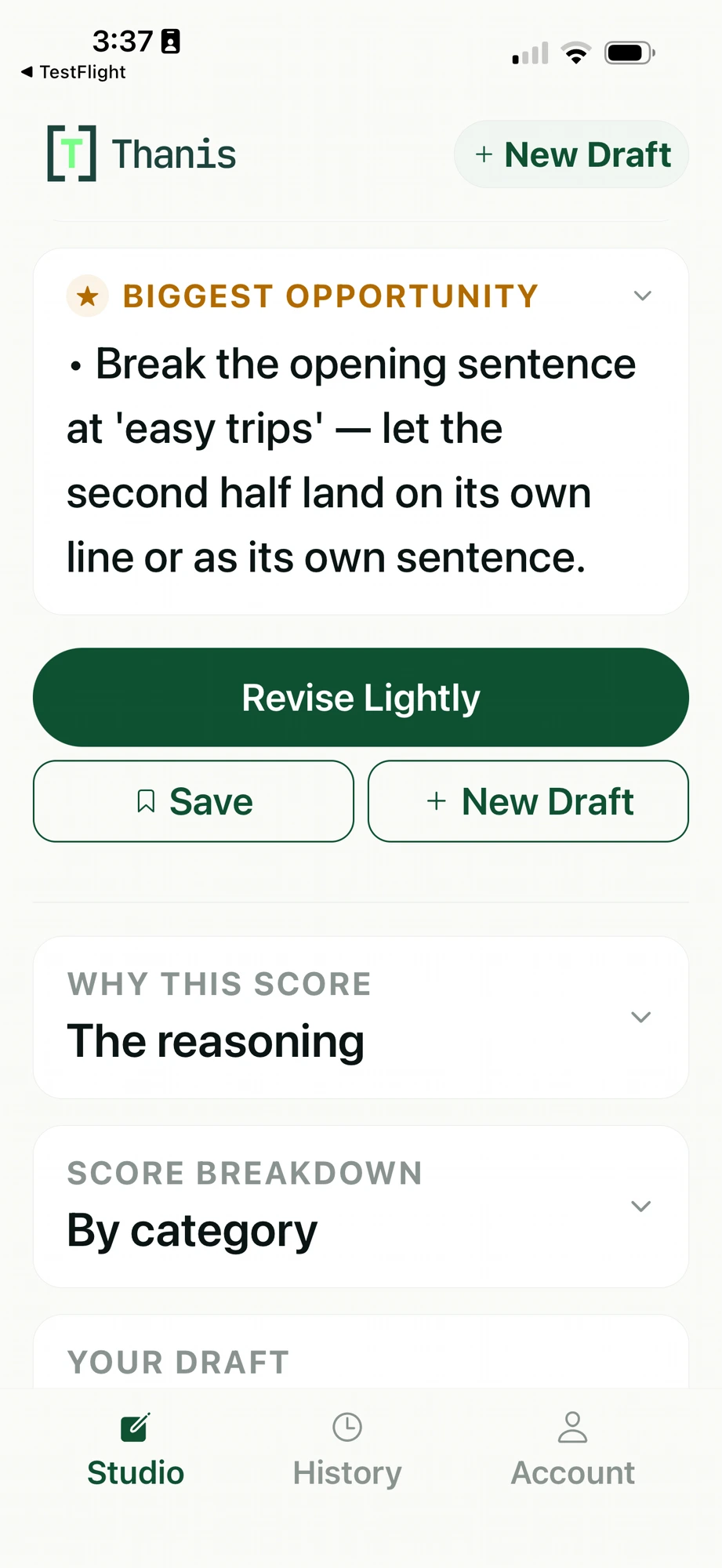
What to work on first
Why Thanis flagged it
How the draft scored
Academic, Writer Pro, and Executive reviews each look for what matters in that kind of writing.
A real Thanis review — captured from production.
When ChatGPT fits
- Brainstorming and exploring ideas
- Starting or reshaping a draft
- Asking broad questions
- Getting conversational feedback
- Generating or revising language
When Thanis fits
- You already have a draft
- You want to know how it is doing
- You want to understand why
- You want to know what deserves revision first
- You want to make the final changes yourself
Can you use both?
Yes. You might use ChatGPT to explore an idea, start a draft, or revise something, then use Thanis when you want a second look at the whole piece before you call it done.
Frequently asked questions
Can ChatGPT review a draft too?
Yes. ChatGPT can review and discuss a draft when asked. Thanis is built for that one job: it reads the whole draft and shows you how it is doing, why, and what to work on first.
Can I use ChatGPT and Thanis together?
Yes. They can serve different purposes at different stages of the writing process.
Does Thanis rewrite my draft?
No. Thanis shows you what may need attention and explains why. You decide what to change and how to revise it.
Product capabilities change. This comparison reflects publicly described product information reviewed August 23, 2026.
Before you call the draft done,
run it through Thanis.
See what needs work, why, and what to revise first.